
If Google is not indexing your pages, the cause is almost always one of three things: the page is blocked or hidden by a technical signal, Google has crawled it and judged it too thin to bother indexing, or Google has found the URL but has not yet prioritized crawling it. Everything in this guide sorts your problem into one of those three buckets and gives you the fix for each. I have run this same sequence across e-commerce catalogs, programmatic pages, and standard content sites for more than a decade, and the order matters more than any single tactic.
Before you touch anything, understand one thing that saves people weeks of wasted effort. Not every unindexed URL is a problem. A large share of the pages sitting in your “not indexed” reports are supposed to be there. Login pages, cart pages, filtered URLs, internal search results, and pagination are all pages Google is right to skip. The real work is separating the pages that should be indexed from the ones that were never meant to be, and then fixing only the first group.
| Quick answer
Google usually is not indexing your pages because of a noindex tag, a robots.txt block, thin or duplicate content, a missing internal link, a canonical error, or a crawl budget limit. Open the Page Indexing report and the URL Inspection Tool in Google Search Console to find the exact status, fix technical blockers first, then improve content quality. Fix the cause, then request indexing once. |
What “indexing” actually means
Crawling, rendering, and indexing are three different stages, and your fix depends on which one failed
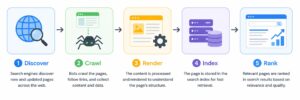
Indexing is the stage where Google decides your page is worth storing in its search database so it can appear in results. It is the final step of a pipeline, not the first. Google first discovers the URL, then crawls it by fetching the content, then renders it to see the page the way a user would, and only then makes an indexing decision.
This distinction is the whole game. A page that was never crawled has a discovery or crawl problem. A page that was crawled but left out has a quality or intent problem. If you apply a content fix to a crawl problem, or a crawl fix to a quality problem, you will spin your wheels. So the first job is always to find out which stage failed, and Search Console tells you that directly.
The simplest way to hold it in your head: discover, then crawl, then render, then index, then rank. A page has to clear every stage before it can earn traffic, and your Search Console status tells you the exact stage where yours stopped.
The Search Console statuses, and what each one is really telling you
Read the status first, because it points straight at the fix
Google groups unindexed pages into named statuses. Each one maps to a different underlying problem, so before you change anything, match your status to this table.
| Search Console status |
What it actually means |
Where the fix lives |
| Excluded by noindex tag |
A noindex tag is telling Google to stay out |
Remove the tag, then request indexing |
| Blocked by robots.txt |
Googlebot is not allowed to crawl the URL |
Unblock the path in robots.txt |
| Crawled – currently not indexed |
Google fetched the page and chose not to store it |
Content depth, originality, internal links |
| Discovered – currently not indexed |
Google knows the URL exists but has not crawled it |
Crawl budget, internal links, sitemap, authority |
| Duplicate without user-selected canonical |
Google found near-identical pages and picked its own |
Add a self-referencing canonical |
| Page with redirect |
The URL redirects elsewhere, excluded by design |
Confirm the redirect is intentional, not a chain |
| Soft 404 |
Returns 200 but looks empty or broken to Google |
Add real content or return a proper status |
Keep this table open while you work. It turns a vague “my pages are not indexing” into a specific, named problem with a specific fix.
How to diagnose the exact status in Search Console
Two tools, used in the right order, tell you everything before you change a single line
Start with the specific page. Paste the URL into the URL Inspection bar at the top of any Search Console screen. If it says the URL is not on Google, the page genuinely is not indexed, and the report will name the reason. Trust this over the Pages report, because Search Console data can lag by days or even weeks.
For the site-wide view, open Indexing, then Pages, then scroll to the table titled “Why pages aren’t indexed.” Google renamed this from Index Coverage, so older tutorials will call it that. Click into a status to see the affected URLs. Two limits to know upfront: you cannot search or filter by URL inside this report, and the example list is capped at 1,000 rows. On a large site you will need a crawler or the API to get the full picture.
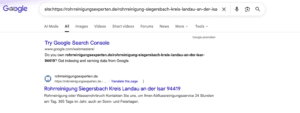
A quick cross-check that costs nothing: search site:yourdomain.com/your-page-url in Google. If the page shows up, it is indexed. If it does not, it is not. This is a fast confirmation, not a full diagnosis, so always return to Search Console for the reason.
Status one: blocked or hidden by a technical signal
If Google is being told not to index the page, no amount of content work will help
This is the first thing to rule out because it is the fastest to confirm and the most common self-inflicted wound. If your page carries a noindex tag, Search Console will show it as “Excluded by noindex tag,” not as a quality issue. That is an important tell. Pages with noindex tags show a different status in Search Console, so if you see “Crawled – currently not indexed,” the page does not have a noindex tag.
Work through this short technical checklist for any page that should be indexed but is not. Check for a stray noindex tag in the page head or HTTP header, which staging environments and CMS plugins add far more often than people expect. Check robots.txt, but understand what it does and does not do, because a page blocked there cannot be crawled at all and shows a different status. Confirm the canonical tag points to the page itself and not to a different URL that Google is treating as the master copy. Confirm the page returns a clean 200 status and not a soft 404 or a redirect. And confirm the page is not sitting behind a login or a parameter that hides the content from Googlebot.
Here is the full set of technical causes I audit against, with the fastest way to catch each one.
| # |
Technical cause |
How I catch it |
| 1 |
Stray noindex tag |
View source or crawl with Screaming Frog, search for “noindex” |
| 2 |
Blocked by robots.txt |
Check yourdomain.com/robots.txt for a Disallow on the path |
| 3 |
Wrong canonical tag |
View source, confirm the canonical URL matches the page |
| 4 |
Redirect chain or loop |
Trace the URL through a redirect checker, keep it to one hop |
| 5 |
Soft 404 |
Look for a 200 status on empty or broken pages |
| 6 |
Server errors (5xx) |
Check the Crawl Stats report and hosting logs |
| 7 |
JavaScript rendering gap |
Use Test Live URL to see what Googlebot actually renders |
If none of these apply and the status is a quality one, move on.
Status two: crawled, currently not indexed
Google saw the page and decided it was not worth storing, which is a judgment about value
This is the status that sets off the most alarm, and it is worth being precise about what it means. It is an algorithmic decision, not a manual action or penalty. Google fetched the page, evaluated it, and concluded it does not currently clear the bar for inclusion. Between this and its sibling status, this is the more serious one, because it almost always points to a content quality, technical, or intent alignment issue that needs your direct attention.
Before you fix anything, triage. Export the list and sort the URLs into groups: utility pages that are supposed to be excluded, thin or auto-generated pages, duplicates, and legitimate content pages that deserve to be indexed. If the bulk of your list is login, cart, and internal search pages, you may not have a problem at all. As a rough gauge, having 5 to 15 percent of crawled pages in this status is common and not alarming, especially if they are utility pages, pagination, or archives. If more than 20 to 30 percent of your content pages are affected, or if the number is growing, investigate further.
For the pages that genuinely should be indexed, here is where I focus, in order of impact.
First, content depth and originality, because this moves the needle more than anything else. The page has to justify its own existence. Add original explanations, step-by-step frameworks, screenshots, real fixes you have applied, or insights based on experience. A page that restates what ten indexed pages already say gives Google no reason to store an eleventh copy.
Second, duplication and cannibalization. Overlapping content confuses Google, so merge similar pages, keep one primary URL, and strengthen the internal signals to the version you want indexed. Two pages fighting for the same intent often means neither gets indexed.
Third, internal linking, which is the lever most people underuse. A page with no internal links pointing to it looks unimportant no matter how good it is. The fix is to find a relevant page that already ranks and is topically related, then link to the stranded page from inside its content, using descriptive anchor text rather than “click here.”
Fourth, intent and format alignment, which is subtle and often missed. Google evaluates whether your format matches what searchers want for that query. If the top-ranking pages for your target keyword are all listicles and how-to guides but your page is a long-form opinion piece, Google may decide your page does not serve the query, even if the writing is excellent.
Fifth, technical rendering and speed, because a page Google cannot fully load is a page it cannot fully value. If your page loads slowly, throws server errors, or fails to render completely before Googlebot’s timeout, the crawler may abandon the visit, and partially crawled pages are more likely to fail indexing. Prioritize Largest Contentful Paint and Cumulative Layout Shift, and keep server response times low.
Status three: discovered, currently not indexed
Google knows the URL exists but has not gotten around to crawling it, which is a priority problem
This one is different in kind from the status above, and confusing the two leads to the wrong fix. Discovered but not indexed typically means Google found the URL, usually through your sitemap or an internal link, but has not yet assigned it a crawl visit. This is more likely a crawl budget or site authority issue than a content one.
The pattern here is a large site, or a site with low authority, where Google is rationing how much it crawls. The fixes are about earning crawl priority rather than improving a single page. Strengthen internal linking so important URLs are reachable in a few clicks from your homepage. Prune or consolidate the low-value URLs that are eating crawl budget, because too many thin URLs waste it and cleaning them up helps Google focus on the content that matters. Make sure your sitemap only lists canonical, indexable URLs, since a sitemap full of junk trains Google to trust it less. And keep building the site’s overall authority, because crawl frequency tracks authority closely.
A real before and after from my client work
What the fix looks like when it lands, using a live Google Search Console account
Theory is cheap, so here is what this looks like on a real site I worked on. Everything below comes straight from the Page Indexing report in Google Search Console, before and after the work.
Indexation status: before
The starting point, with most of the site invisible in search
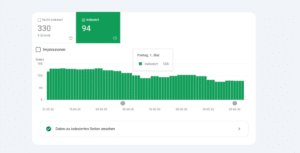
When I began working on the site, Search Console showed only 94 pages indexed while 330 pages were sitting outside Google’s index. In practical terms, the majority of the website was invisible in search. Pages that cannot be indexed cannot rank, no matter how good the content is, so fixing this was my first priority.
This snapshot shows the state of the site at the start of the engagement. The indexed count is stuck at 94, and the trend line is flat and even declining slightly across the period. That is a classic symptom of crawl and indexation issues, where Google discovers pages but chooses not to keep them, usually because of technical signals, duplicate or thin content, or weak internal linking.
Indexation status: after
The result once the underlying issues were fixed
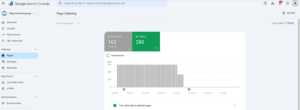
After the work, indexed pages grew from 94 to 259, an increase of over 175 percent, while not-indexed pages dropped from 330 to 182. Google is now accepting and retaining far more of the site’s pages. Every newly indexed page is a fresh opportunity to appear in search, capture impressions, and bring in customers.
Indexation is the foundation everything else in SEO sits on. This first phase recovered the site’s visibility, but my diagnosis showed the instability had a deeper root cause: the site automatically generates local pages that Google keeps indexing and then dropping. The next phase addresses that at the source, so the index stays stable and the content and keyword work can compound over the coming months.
What actually moved the needle here: the fix was not exotic. It was the unglamorous combination of resolving the technical signals that were pushing pages out of the index, tightening internal linking so important pages looked important, and cutting the thin auto-generated pages that were diluting crawl budget. When those line up, the indexed count climbs on the next few crawls.
The tools I actually use to diagnose this
A short, honest toolkit, not a list of everything that exists
| Tool |
Best for |
Cost |
| Google Search Console |
The official status, URL Inspection, and index coverage |
Free |
| Screaming Frog |
Site-wide crawl to catch noindex, canonicals, and orphans |
Free and paid tiers |
| A log file analyzer |
Seeing exactly how Googlebot crawls your site |
Paid |
Search Console is where every diagnosis starts and ends. The other two earn their place only when a site is large enough that you cannot eyeball the problem, which for indexing usually means a few hundred URLs or more.
Why requesting indexing over and over does nothing
The button does not do what people think it does, and hammering it wastes your time
I include this because it is the single most common wasted effort I see. Clicking Request Indexing does not jump the queue and does not fix anything. It only adds a URL to a queue. If the underlying reason the page was skipped is still there, it will be skipped again. Clicking Request Indexing forty-seven times does not make Google index your page faster. Fix the cause first, then request once.
How long indexing takes after you fix the cause
Realistic timeframes, with the honest caveat that nothing is guaranteed
Once you have made a genuine improvement, indexing usually follows within a few days to a few weeks, depending on your site’s size and authority. Do not expect an instant result, and do not resubmit repeatedly while you wait. The honest framing is that Google is clear indexing is never guaranteed at any timeframe. What you are doing with every fix in this guide is raising the probability, not flipping a switch. In practice, when the fix is real, the result can be fast. On one account I worked, the large majority of a batch of stuck pages indexed within days once content quality and internal linking were fixed, and the handful that still did not index genuinely were not good enough, so they were consolidated and redirected.
The troubleshooting order I actually follow
One clean sequence, so you never fix the wrong thing
When a client sends me a page that will not index, I work through it in this exact order, and I recommend you do the same. Inspect the single URL first to get the real status straight from Google. Rule out technical blocks, meaning noindex, robots.txt, canonicals, redirects, and status codes, because those are fast to confirm and override everything else. Then read the status: if it is crawled but not indexed, the problem is value, so work on depth, duplication, internal links, intent match, and rendering. If it is discovered but not crawled, the problem is priority, so work on internal linking, crawl budget cleanup, sitemap hygiene, and authority. Make the real fix, request indexing once, and then wait without hammering the button.
Follow that sequence and you stop guessing. You will know within the first two steps whether you are dealing with a signal, a value problem, or a priority problem, and each one has a clear set of moves.
Frequently asked questions
Does “crawled currently not indexed” mean my site is penalized?
No. This is an algorithmic decision about one specific page, not a manual action against your whole site. Google crawled the page, weighed it, and decided it does not yet clear the bar for inclusion. Nothing is being punished. The page simply has not earned a spot in the index. Treat it as feedback on that single URL, look at what the page offers, and improve its depth or uniqueness rather than worrying about a site-wide problem that is not there.
Will adding pages to my sitemap force Google to index them?
No. A sitemap helps Google discover and crawl your URLs faster, but it never forces an indexing decision. Think of it as a suggestion, not an instruction. Once Google reaches the page, the outcome still comes down to value and priority, the same as any other URL. A sitemap stuffed with thin or low-value pages can even work against you by training Google to trust it less. Keep your sitemap limited to canonical, indexable pages you genuinely want ranked.
Does a noindex tag cause this status?
No. A noindex tag produces a separate status in Search Console called “Excluded by noindex tag.” So if you are looking at “Crawled currently not indexed” or “Discovered currently not indexed,” the page does not carry a noindex tag. That distinction matters, because it tells you where to aim your fix. A noindex issue is a technical signal you remove. The crawled or discovered status is about value and priority, which you solve through content, internal linking, and crawl budget instead.
How much of this status is normal?
Some of it is completely normal. For most sites, 5 to 15 percent of crawled pages sitting in this status is nothing to worry about, especially when those URLs are utility pages, pagination, or archives that were never meant to rank. The number itself is not the alarm. What matters is which pages are affected. Once more than 20 to 30 percent of your genuine content pages land here, or the count keeps climbing, that is your signal to investigate and act.
What is the single highest-impact fix?
Improving the actual content so the page offers unique value. Technical configuration matters, and you should clear any blocks first, but for legitimate content pages that deserve to rank, depth and originality move indexing decisions faster than anything else. A page that simply repeats what a dozen indexed pages already say gives Google no reason to store another copy. Add real experience, original explanations, and specifics only you can provide, and indexing decisions tend to shift in your favor.


If Google is not indexing your pages, the cause is almost always one of three things: the page is blocked or hidden by a technical signal, Google has crawled it and judged it too thin to bother indexing, or Google has found the URL but has not yet prioritized crawling it. Everything in this guide sorts your problem into one of those three buckets and gives you the fix for each. I have run this same sequence across e-commerce catalogs, programmatic pages, and standard content sites for more than a decade, and the order matters more than any single tactic.
Before you touch anything, understand one thing that saves people weeks of wasted effort. Not every unindexed URL is a problem. A large share of the pages sitting in your “not indexed” reports are supposed to be there. Login pages, cart pages, filtered URLs, internal search results, and pagination are all pages Google is right to skip. The real work is separating the pages that should be indexed from the ones that were never meant to be, and then fixing only the first group.
Google usually is not indexing your pages because of a noindex tag, a robots.txt block, thin or duplicate content, a missing internal link, a canonical error, or a crawl budget limit. Open the Page Indexing report and the URL Inspection Tool in Google Search Console to find the exact status, fix technical blockers first, then improve content quality. Fix the cause, then request indexing once.
What “indexing” actually means
Crawling, rendering, and indexing are three different stages, and your fix depends on which one failed
Indexing is the stage where Google decides your page is worth storing in its search database so it can appear in results. It is the final step of a pipeline, not the first. Google first discovers the URL, then crawls it by fetching the content, then renders it to see the page the way a user would, and only then makes an indexing decision.
This distinction is the whole game. A page that was never crawled has a discovery or crawl problem. A page that was crawled but left out has a quality or intent problem. If you apply a content fix to a crawl problem, or a crawl fix to a quality problem, you will spin your wheels. So the first job is always to find out which stage failed, and Search Console tells you that directly.
The simplest way to hold it in your head: discover, then crawl, then render, then index, then rank. A page has to clear every stage before it can earn traffic, and your Search Console status tells you the exact stage where yours stopped.
The Search Console statuses, and what each one is really telling you
Read the status first, because it points straight at the fix
Google groups unindexed pages into named statuses. Each one maps to a different underlying problem, so before you change anything, match your status to this table.
Keep this table open while you work. It turns a vague “my pages are not indexing” into a specific, named problem with a specific fix.
How to diagnose the exact status in Search Console
Two tools, used in the right order, tell you everything before you change a single line
Start with the specific page. Paste the URL into the URL Inspection bar at the top of any Search Console screen. If it says the URL is not on Google, the page genuinely is not indexed, and the report will name the reason. Trust this over the Pages report, because Search Console data can lag by days or even weeks.
For the site-wide view, open Indexing, then Pages, then scroll to the table titled “Why pages aren’t indexed.” Google renamed this from Index Coverage, so older tutorials will call it that. Click into a status to see the affected URLs. Two limits to know upfront: you cannot search or filter by URL inside this report, and the example list is capped at 1,000 rows. On a large site you will need a crawler or the API to get the full picture.
A quick cross-check that costs nothing: search site:yourdomain.com/your-page-url in Google. If the page shows up, it is indexed. If it does not, it is not. This is a fast confirmation, not a full diagnosis, so always return to Search Console for the reason.
Status one: blocked or hidden by a technical signal
If Google is being told not to index the page, no amount of content work will help
This is the first thing to rule out because it is the fastest to confirm and the most common self-inflicted wound. If your page carries a noindex tag, Search Console will show it as “Excluded by noindex tag,” not as a quality issue. That is an important tell. Pages with noindex tags show a different status in Search Console, so if you see “Crawled – currently not indexed,” the page does not have a noindex tag.
Work through this short technical checklist for any page that should be indexed but is not. Check for a stray noindex tag in the page head or HTTP header, which staging environments and CMS plugins add far more often than people expect. Check robots.txt, but understand what it does and does not do, because a page blocked there cannot be crawled at all and shows a different status. Confirm the canonical tag points to the page itself and not to a different URL that Google is treating as the master copy. Confirm the page returns a clean 200 status and not a soft 404 or a redirect. And confirm the page is not sitting behind a login or a parameter that hides the content from Googlebot.
Here is the full set of technical causes I audit against, with the fastest way to catch each one.
If none of these apply and the status is a quality one, move on.
Status two: crawled, currently not indexed
Google saw the page and decided it was not worth storing, which is a judgment about value
This is the status that sets off the most alarm, and it is worth being precise about what it means. It is an algorithmic decision, not a manual action or penalty. Google fetched the page, evaluated it, and concluded it does not currently clear the bar for inclusion. Between this and its sibling status, this is the more serious one, because it almost always points to a content quality, technical, or intent alignment issue that needs your direct attention.
Before you fix anything, triage. Export the list and sort the URLs into groups: utility pages that are supposed to be excluded, thin or auto-generated pages, duplicates, and legitimate content pages that deserve to be indexed. If the bulk of your list is login, cart, and internal search pages, you may not have a problem at all. As a rough gauge, having 5 to 15 percent of crawled pages in this status is common and not alarming, especially if they are utility pages, pagination, or archives. If more than 20 to 30 percent of your content pages are affected, or if the number is growing, investigate further.
For the pages that genuinely should be indexed, here is where I focus, in order of impact.
First, content depth and originality, because this moves the needle more than anything else. The page has to justify its own existence. Add original explanations, step-by-step frameworks, screenshots, real fixes you have applied, or insights based on experience. A page that restates what ten indexed pages already say gives Google no reason to store an eleventh copy.
Second, duplication and cannibalization. Overlapping content confuses Google, so merge similar pages, keep one primary URL, and strengthen the internal signals to the version you want indexed. Two pages fighting for the same intent often means neither gets indexed.
Third, internal linking, which is the lever most people underuse. A page with no internal links pointing to it looks unimportant no matter how good it is. The fix is to find a relevant page that already ranks and is topically related, then link to the stranded page from inside its content, using descriptive anchor text rather than “click here.”
Fourth, intent and format alignment, which is subtle and often missed. Google evaluates whether your format matches what searchers want for that query. If the top-ranking pages for your target keyword are all listicles and how-to guides but your page is a long-form opinion piece, Google may decide your page does not serve the query, even if the writing is excellent.
Fifth, technical rendering and speed, because a page Google cannot fully load is a page it cannot fully value. If your page loads slowly, throws server errors, or fails to render completely before Googlebot’s timeout, the crawler may abandon the visit, and partially crawled pages are more likely to fail indexing. Prioritize Largest Contentful Paint and Cumulative Layout Shift, and keep server response times low.
Status three: discovered, currently not indexed
Google knows the URL exists but has not gotten around to crawling it, which is a priority problem
This one is different in kind from the status above, and confusing the two leads to the wrong fix. Discovered but not indexed typically means Google found the URL, usually through your sitemap or an internal link, but has not yet assigned it a crawl visit. This is more likely a crawl budget or site authority issue than a content one.
The pattern here is a large site, or a site with low authority, where Google is rationing how much it crawls. The fixes are about earning crawl priority rather than improving a single page. Strengthen internal linking so important URLs are reachable in a few clicks from your homepage. Prune or consolidate the low-value URLs that are eating crawl budget, because too many thin URLs waste it and cleaning them up helps Google focus on the content that matters. Make sure your sitemap only lists canonical, indexable URLs, since a sitemap full of junk trains Google to trust it less. And keep building the site’s overall authority, because crawl frequency tracks authority closely.
A real before and after from my client work
What the fix looks like when it lands, using a live Google Search Console account
Theory is cheap, so here is what this looks like on a real site I worked on. Everything below comes straight from the Page Indexing report in Google Search Console, before and after the work.
Indexation status: before
The starting point, with most of the site invisible in search
When I began working on the site, Search Console showed only 94 pages indexed while 330 pages were sitting outside Google’s index. In practical terms, the majority of the website was invisible in search. Pages that cannot be indexed cannot rank, no matter how good the content is, so fixing this was my first priority.
This snapshot shows the state of the site at the start of the engagement. The indexed count is stuck at 94, and the trend line is flat and even declining slightly across the period. That is a classic symptom of crawl and indexation issues, where Google discovers pages but chooses not to keep them, usually because of technical signals, duplicate or thin content, or weak internal linking.
Indexation status: after
The result once the underlying issues were fixed
After the work, indexed pages grew from 94 to 259, an increase of over 175 percent, while not-indexed pages dropped from 330 to 182. Google is now accepting and retaining far more of the site’s pages. Every newly indexed page is a fresh opportunity to appear in search, capture impressions, and bring in customers.
Indexation is the foundation everything else in SEO sits on. This first phase recovered the site’s visibility, but my diagnosis showed the instability had a deeper root cause: the site automatically generates local pages that Google keeps indexing and then dropping. The next phase addresses that at the source, so the index stays stable and the content and keyword work can compound over the coming months.
The tools I actually use to diagnose this
A short, honest toolkit, not a list of everything that exists
Search Console is where every diagnosis starts and ends. The other two earn their place only when a site is large enough that you cannot eyeball the problem, which for indexing usually means a few hundred URLs or more.
Why requesting indexing over and over does nothing
The button does not do what people think it does, and hammering it wastes your time
I include this because it is the single most common wasted effort I see. Clicking Request Indexing does not jump the queue and does not fix anything. It only adds a URL to a queue. If the underlying reason the page was skipped is still there, it will be skipped again. Clicking Request Indexing forty-seven times does not make Google index your page faster. Fix the cause first, then request once.
How long indexing takes after you fix the cause
Realistic timeframes, with the honest caveat that nothing is guaranteed
Once you have made a genuine improvement, indexing usually follows within a few days to a few weeks, depending on your site’s size and authority. Do not expect an instant result, and do not resubmit repeatedly while you wait. The honest framing is that Google is clear indexing is never guaranteed at any timeframe. What you are doing with every fix in this guide is raising the probability, not flipping a switch. In practice, when the fix is real, the result can be fast. On one account I worked, the large majority of a batch of stuck pages indexed within days once content quality and internal linking were fixed, and the handful that still did not index genuinely were not good enough, so they were consolidated and redirected.
The troubleshooting order I actually follow
One clean sequence, so you never fix the wrong thing
When a client sends me a page that will not index, I work through it in this exact order, and I recommend you do the same. Inspect the single URL first to get the real status straight from Google. Rule out technical blocks, meaning noindex, robots.txt, canonicals, redirects, and status codes, because those are fast to confirm and override everything else. Then read the status: if it is crawled but not indexed, the problem is value, so work on depth, duplication, internal links, intent match, and rendering. If it is discovered but not crawled, the problem is priority, so work on internal linking, crawl budget cleanup, sitemap hygiene, and authority. Make the real fix, request indexing once, and then wait without hammering the button.
Follow that sequence and you stop guessing. You will know within the first two steps whether you are dealing with a signal, a value problem, or a priority problem, and each one has a clear set of moves.
Frequently asked questions
Does “crawled currently not indexed” mean my site is penalized?
No. This is an algorithmic decision about one specific page, not a manual action against your whole site. Google crawled the page, weighed it, and decided it does not yet clear the bar for inclusion. Nothing is being punished. The page simply has not earned a spot in the index. Treat it as feedback on that single URL, look at what the page offers, and improve its depth or uniqueness rather than worrying about a site-wide problem that is not there.
Will adding pages to my sitemap force Google to index them?
No. A sitemap helps Google discover and crawl your URLs faster, but it never forces an indexing decision. Think of it as a suggestion, not an instruction. Once Google reaches the page, the outcome still comes down to value and priority, the same as any other URL. A sitemap stuffed with thin or low-value pages can even work against you by training Google to trust it less. Keep your sitemap limited to canonical, indexable pages you genuinely want ranked.
Does a noindex tag cause this status?
No. A noindex tag produces a separate status in Search Console called “Excluded by noindex tag.” So if you are looking at “Crawled currently not indexed” or “Discovered currently not indexed,” the page does not carry a noindex tag. That distinction matters, because it tells you where to aim your fix. A noindex issue is a technical signal you remove. The crawled or discovered status is about value and priority, which you solve through content, internal linking, and crawl budget instead.
How much of this status is normal?
Some of it is completely normal. For most sites, 5 to 15 percent of crawled pages sitting in this status is nothing to worry about, especially when those URLs are utility pages, pagination, or archives that were never meant to rank. The number itself is not the alarm. What matters is which pages are affected. Once more than 20 to 30 percent of your genuine content pages land here, or the count keeps climbing, that is your signal to investigate and act.
What is the single highest-impact fix?
Improving the actual content so the page offers unique value. Technical configuration matters, and you should clear any blocks first, but for legitimate content pages that deserve to rank, depth and originality move indexing decisions faster than anything else. A page that simply repeats what a dozen indexed pages already say gives Google no reason to store another copy. Add real experience, original explanations, and specifics only you can provide, and indexing decisions tend to shift in your favor.
If Google is not indexing your pages, the cause is…
Read MoreYour pages are published and Google hasn’t picked them up.…
Read MoreContent Rynek Starego Miasta Kamienice Starego Miasta: Pod Świętą Anną…
Read MoreContent Welche online Casinos mit welcher Lizenz sind ohne Limit?…
Read MoreContent Jackbit – Giros gratis sin wagering como método de…
Read MoreContent PokerStars: Melhores Salas de Poker do País Critérios de…
Read MoreContent Los mejores juegos de casino gratis Juegos de casino…
Read MoreContent Bonificaciones Top 10 – Casinos con las mejores salas…
Read MoreContent Najlepsze sloty w kasynach w Polsce Top 5 Kasyn…
Read More