Your pages are published and Google hasn’t picked them up. Blog posts, product URLs, PDFs, backlinks you paid for, all sitting outside the index doing nothing for you.
We push them in. Direct API submission, manual work on every URL, no access to your site required. Send us a list and your URLs go into the queue within the hour. Most clean pages appear in Google inside 24 hours, and some land in minutes.
No logins. No plugins. No changes to your code or content. You send URLs, we handle the rest, using Google-approved methods only.
The problem you’re actually having
Discovered, crawled, and still not in the index
You published the page three weeks ago. It’s in your sitemap. It loads fine. And it’s still sitting in Search Console under “Discovered – currently not indexed,” which is Google’s polite way of saying it knows the page exists and hasn’t decided it’s worth reading.
Meanwhile a competitor published something thinner last Tuesday and it’s already ranking. That gap is not a content problem. It’s a discovery and priority problem, and it’s fixable.
What indexing actually means
Crawled, indexed and ranked are three different things
Google finds your URL. That’s discovery. Google downloads and reads it. That’s crawling. Google decides the page belongs in search results and stores it. That’s indexing. Only then can it rank.
Most site owners assume publishing equals indexing. It doesn’t. Google runs on a budget, prioritises what it already trusts, and a new URL on a site with weak signals sits in a queue behind everything else. The page isn’t rejected. It’s just not urgent to Google.
Our job is to make it urgent.
Discovered and Crawled, currently not indexed
The two errors that bring most people to this page
These are the two statuses that fill up Search Console and confuse everyone, and they mean different things.
“Discovered – currently not indexed” means Google knows the URL exists but hasn’t crawled it yet. This is a crawl priority problem, not a content problem. Google found the address and hasn’t bothered driving there. It’s the one we move fastest on, and it needs nothing from you but the URL list.
“Crawled – currently not indexed” is different and I’d rather be straight with you about it. Google read the page and decided not to store it. That’s a judgment about quality, duplication or value. I diagnose these in minutes and most are fixable the same day, but the fix depends on the cause. Sometimes it’s a canonical tag pointing elsewhere, a near-duplicate of another page on your site, or a thin template. Anyone telling you every “Crawled – not indexed” URL clears in five minutes is selling you a resubmission, and a resubmission of a page Google already rejected changes nothing.
The good news is that in most cases neither error requires rebuilding your site or rewriting your content. They’re configuration and signal problems, and those are quick.
Why your pages aren’t getting indexed
The causes are boring and specific, not mysterious
The most common one I see is a page with no internal links pointing at it. Google discovers URLs by following links. If your new page only exists in the sitemap and nothing on the site points to it, you’ve handed Google an address with no road leading there.
Second is leftover technical blocking. A noindex tag that survived a staging push. A robots.txt rule written for a subfolder that now covers half the site. A canonical tag pointing somewhere else, which tells Google this page is a duplicate and can be ignored.
Third is quality thresholds. Google won’t index a page that duplicates something already in its index or has almost nothing on it. Thin product variants, tag archives and near-identical location pages get skipped constantly.
Fourth is crawl budget. On large sites, Google allocates a finite amount of crawling. If it’s burning that budget on parameter URLs, faceted navigation and redirect chains, your important pages wait.
Fifth is site-level trust. A newer domain with few referring links gets crawled infrequently. Nothing is broken. Google just hasn’t got round to you.
How I get URLs indexed
Submission gets them in the queue, diagnosis tells you why some don’t stick
I push your URLs through Google’s own submission channels instead of waiting for a crawl cycle to find them. That happens within the hour. It’s also where most cheap indexing services stop, which is why their results are so inconsistent.
Before submitting, we check each URL from the outside for the things that make submission pointless. A noindex tag left in place. A robots.txt rule blocking the path. A canonical pointing at a different page. Redirect chains and soft 404s. None of this needs access to your site, and if any of it is present, no submission method on earth will get that page indexed.
Then we track what actually landed. You get a status for every URL, and for anything still outside the index, the specific reason and the fix. Sometimes that’s a tag to remove. Sometimes it’s a page that’s too close to another one you already have. You decide what to act on. We won’t resubmit a URL Google has already turned down and bill you for it.
How fast this works
Submission in minutes, indexing usually inside 24 to 48 hours
Nobody controls Google’s index. Anyone promising guaranteed indexing in a fixed number of minutes is quoting their own submission speed and hoping you don’t spot the difference.
Here’s what we commit to. Your URLs are in the queue within the hour. Most clean, indexable pages show up in Google within 24 to 48 hours, and plenty land inside the first hour. Pages with real problems take longer, and you’ll hear which ones and why.
Proof this works
Live URLs you can check yourself
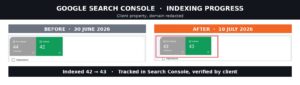
Here’s a recent project from November 2025. The client publishes at volume and needed over 1,000 URLs indexed daily, consistently, without crawl errors piling up. The challenge was keeping newly published pages discovered and indexed quickly at that scale, day after day.
I monitored indexing rates throughout, cleared crawl errors as they surfaced, and adjusted the approach whenever index rates dipped. The result was daily indexing at 1,000+ URLs with a high success rate, which gave the client faster content discovery and a measurable lift in overall visibility.
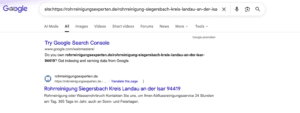
Below are sample URLs from that project with their publish date and the date they appeared in Google. Paste any of them into Google with site: in front and you’ll see them in the index for yourself.
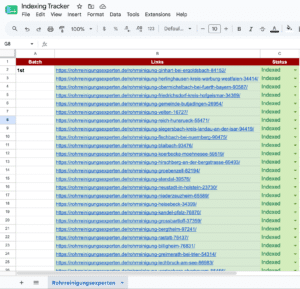
I keep records for every project. If you want to see results from a site in your niche before you commit, ask and I’ll send them.
Who this is for
Anyone watching pages sit outside the index while the clock runs
E-commerce sites launching large batches of product URLs that need to be findable before the season starts. Publishers and news sites where a two-day indexing delay makes the article worthless. Programmatic SEO builds where thousands of pages have gone live and a fraction have been picked up. Site migrations where the new URLs need to be indexed before the old rankings evaporate. New sites with no crawl history, where Google visits once a fortnight. And anyone who has bought backlinks that Google has never crawled, which means they’re doing nothing at all.
What you get
A status for every URL, and a reason for the ones that didn’t make it
Send me a list. I submit them, check them, and report back with where each one stands. Indexed URLs are marked with the date they landed. Anything still out gets the reason and what would fix it, not a shrug.
If the problem is structural rather than a submission issue, I’ll tell you that too. Shorter conversation than taking your money twice.
Common questions
How long does Google take to index a page normally?
Anywhere from a few hours to several weeks, depending on how often Google crawls your site and how much it trusts the domain. New sites sit at the slow end. That variance is the entire reason this service exists.
Do you need access to my website?
No. No admin logins, no plugins, no changes to your site. A list of URLs is all I need. Everything runs from my end using indexing tools and Google’s own submission channels.
Will this get my site penalised?
No. Everything I use is a Google-approved submission method. I don’t use automated indexing networks or anything that pings your URLs at scale from unrelated domains, which is the practice that gets sites into trouble.
Can you index backlinks?
Yes, and this is one of the most common requests I get. A backlink Google has never crawled passes no value. Getting those URLs indexed is often the single fastest way to make link building you’ve already paid for actually count.
What if a page still doesn’t index?
I tell you why and what would fix it. Usually it’s a quality or duplication issue, and no submission method solves that. You’ll get a straight answer rather than a resubmission.
Can you index PDFs and non-HTML files?
Yes. PDFs, documents and other file types can all be indexed, and they’re frequently overlooked.
Get your pages indexed
Email growthavengers0@gmail.com with your domain and the URLs sitting outside the index. I’ll come back with what’s blocking them and what it takes to fix it, before you commit to anything.


Your pages are published and Google hasn’t picked them up. Blog posts, product URLs, PDFs, backlinks you paid for, all sitting outside the index doing nothing for you.
We push them in. Direct API submission, manual work on every URL, no access to your site required. Send us a list and your URLs go into the queue within the hour. Most clean pages appear in Google inside 24 hours, and some land in minutes.
No logins. No plugins. No changes to your code or content. You send URLs, we handle the rest, using Google-approved methods only.
The problem you’re actually having
Discovered, crawled, and still not in the index
You published the page three weeks ago. It’s in your sitemap. It loads fine. And it’s still sitting in Search Console under “Discovered – currently not indexed,” which is Google’s polite way of saying it knows the page exists and hasn’t decided it’s worth reading.
Meanwhile a competitor published something thinner last Tuesday and it’s already ranking. That gap is not a content problem. It’s a discovery and priority problem, and it’s fixable.
What indexing actually means
Crawled, indexed and ranked are three different things
Google finds your URL. That’s discovery. Google downloads and reads it. That’s crawling. Google decides the page belongs in search results and stores it. That’s indexing. Only then can it rank.
Most site owners assume publishing equals indexing. It doesn’t. Google runs on a budget, prioritises what it already trusts, and a new URL on a site with weak signals sits in a queue behind everything else. The page isn’t rejected. It’s just not urgent to Google.
Our job is to make it urgent.
Discovered and Crawled, currently not indexed
The two errors that bring most people to this page
These are the two statuses that fill up Search Console and confuse everyone, and they mean different things.
“Discovered – currently not indexed” means Google knows the URL exists but hasn’t crawled it yet. This is a crawl priority problem, not a content problem. Google found the address and hasn’t bothered driving there. It’s the one we move fastest on, and it needs nothing from you but the URL list.
“Crawled – currently not indexed” is different and I’d rather be straight with you about it. Google read the page and decided not to store it. That’s a judgment about quality, duplication or value. I diagnose these in minutes and most are fixable the same day, but the fix depends on the cause. Sometimes it’s a canonical tag pointing elsewhere, a near-duplicate of another page on your site, or a thin template. Anyone telling you every “Crawled – not indexed” URL clears in five minutes is selling you a resubmission, and a resubmission of a page Google already rejected changes nothing.
The good news is that in most cases neither error requires rebuilding your site or rewriting your content. They’re configuration and signal problems, and those are quick.
Why your pages aren’t getting indexed
The causes are boring and specific, not mysterious
The most common one I see is a page with no internal links pointing at it. Google discovers URLs by following links. If your new page only exists in the sitemap and nothing on the site points to it, you’ve handed Google an address with no road leading there.
Second is leftover technical blocking. A noindex tag that survived a staging push. A robots.txt rule written for a subfolder that now covers half the site. A canonical tag pointing somewhere else, which tells Google this page is a duplicate and can be ignored.
Third is quality thresholds. Google won’t index a page that duplicates something already in its index or has almost nothing on it. Thin product variants, tag archives and near-identical location pages get skipped constantly.
Fourth is crawl budget. On large sites, Google allocates a finite amount of crawling. If it’s burning that budget on parameter URLs, faceted navigation and redirect chains, your important pages wait.
Fifth is site-level trust. A newer domain with few referring links gets crawled infrequently. Nothing is broken. Google just hasn’t got round to you.
How I get URLs indexed
Submission gets them in the queue, diagnosis tells you why some don’t stick
I push your URLs through Google’s own submission channels instead of waiting for a crawl cycle to find them. That happens within the hour. It’s also where most cheap indexing services stop, which is why their results are so inconsistent.
Before submitting, we check each URL from the outside for the things that make submission pointless. A noindex tag left in place. A robots.txt rule blocking the path. A canonical pointing at a different page. Redirect chains and soft 404s. None of this needs access to your site, and if any of it is present, no submission method on earth will get that page indexed.
Then we track what actually landed. You get a status for every URL, and for anything still outside the index, the specific reason and the fix. Sometimes that’s a tag to remove. Sometimes it’s a page that’s too close to another one you already have. You decide what to act on. We won’t resubmit a URL Google has already turned down and bill you for it.
How fast this works
Submission in minutes, indexing usually inside 24 to 48 hours
Nobody controls Google’s index. Anyone promising guaranteed indexing in a fixed number of minutes is quoting their own submission speed and hoping you don’t spot the difference.
Here’s what we commit to. Your URLs are in the queue within the hour. Most clean, indexable pages show up in Google within 24 to 48 hours, and plenty land inside the first hour. Pages with real problems take longer, and you’ll hear which ones and why.
Proof this works
Live URLs you can check yourself
Here’s a recent project from November 2025. The client publishes at volume and needed over 1,000 URLs indexed daily, consistently, without crawl errors piling up. The challenge was keeping newly published pages discovered and indexed quickly at that scale, day after day.
I monitored indexing rates throughout, cleared crawl errors as they surfaced, and adjusted the approach whenever index rates dipped. The result was daily indexing at 1,000+ URLs with a high success rate, which gave the client faster content discovery and a measurable lift in overall visibility.
Below are sample URLs from that project with their publish date and the date they appeared in Google. Paste any of them into Google with
site:in front and you’ll see them in the index for yourself.I keep records for every project. If you want to see results from a site in your niche before you commit, ask and I’ll send them.
Who this is for
Anyone watching pages sit outside the index while the clock runs
E-commerce sites launching large batches of product URLs that need to be findable before the season starts. Publishers and news sites where a two-day indexing delay makes the article worthless. Programmatic SEO builds where thousands of pages have gone live and a fraction have been picked up. Site migrations where the new URLs need to be indexed before the old rankings evaporate. New sites with no crawl history, where Google visits once a fortnight. And anyone who has bought backlinks that Google has never crawled, which means they’re doing nothing at all.
What you get
A status for every URL, and a reason for the ones that didn’t make it
Send me a list. I submit them, check them, and report back with where each one stands. Indexed URLs are marked with the date they landed. Anything still out gets the reason and what would fix it, not a shrug.
If the problem is structural rather than a submission issue, I’ll tell you that too. Shorter conversation than taking your money twice.
Common questions
How long does Google take to index a page normally?
Anywhere from a few hours to several weeks, depending on how often Google crawls your site and how much it trusts the domain. New sites sit at the slow end. That variance is the entire reason this service exists.
Do you need access to my website?
No. No admin logins, no plugins, no changes to your site. A list of URLs is all I need. Everything runs from my end using indexing tools and Google’s own submission channels.
Will this get my site penalised?
No. Everything I use is a Google-approved submission method. I don’t use automated indexing networks or anything that pings your URLs at scale from unrelated domains, which is the practice that gets sites into trouble.
Can you index backlinks?
Yes, and this is one of the most common requests I get. A backlink Google has never crawled passes no value. Getting those URLs indexed is often the single fastest way to make link building you’ve already paid for actually count.
What if a page still doesn’t index?
I tell you why and what would fix it. Usually it’s a quality or duplication issue, and no submission method solves that. You’ll get a straight answer rather than a resubmission.
Can you index PDFs and non-HTML files?
Yes. PDFs, documents and other file types can all be indexed, and they’re frequently overlooked.
Get your pages indexed
Email growthavengers0@gmail.com with your domain and the URLs sitting outside the index. I’ll come back with what’s blocking them and what it takes to fix it, before you commit to anything.
If Google is not indexing your pages, the cause is…
Read MoreYour pages are published and Google hasn’t picked them up.…
Read MoreContent Rynek Starego Miasta Kamienice Starego Miasta: Pod Świętą Anną…
Read MoreContent Welche online Casinos mit welcher Lizenz sind ohne Limit?…
Read MoreContent Jackbit – Giros gratis sin wagering como método de…
Read MoreContent PokerStars: Melhores Salas de Poker do País Critérios de…
Read MoreContent Los mejores juegos de casino gratis Juegos de casino…
Read MoreContent Bonificaciones Top 10 – Casinos con las mejores salas…
Read MoreContent Najlepsze sloty w kasynach w Polsce Top 5 Kasyn…
Read More